An Introduction to PyAnsys: Revolutionizing Engineering Simulations
How PyAnsys combines Python's flexibility with Ansys's industry-leading solvers, plus a categorized guide to every module in the ecosystem.
NB
Naveen Kumar Begari
Mar 28, 20257 min read
In the dynamic world of engineering simulations, PyAnsys is revolutionizing how professionals, researchers, and students harness the power of Ansys software. As a Python-based interface, PyAnsys seamlessly combines Python's flexibility with Ansys's industry-leading simulation capabilities.
When paired with Python, Ansys becomes even more powerful. PyAnsys is a Python library that allows you to interface directly with Ansys products, automating workflows, simplifying tasks, and opening the door to a whole new world of possibilities in simulation.
Section 01What is PyAnsys?
PyAnsys is an open-source ecosystem of Python libraries and tools developed by Ansys, Inc., designed to integrate seamlessly with Ansys software. By providing a Python-based interface, PyAnsys empowers engineers, researchers, and developers to perform simulations, automate workflows, and process engineering data with greater flexibility.
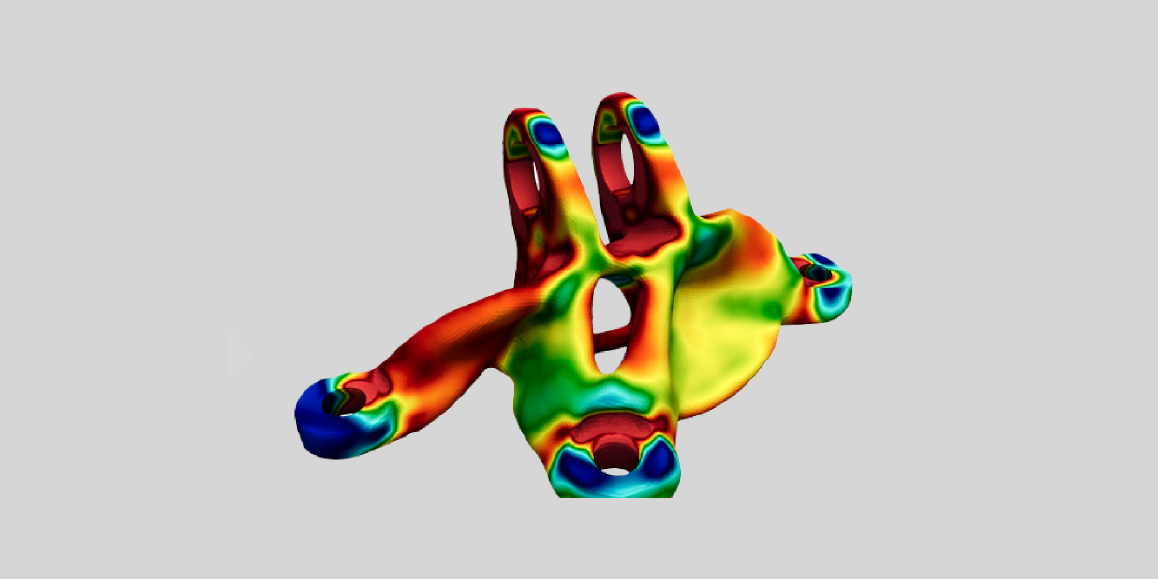
Fig 1 · Python + Ansys = PyAnsys
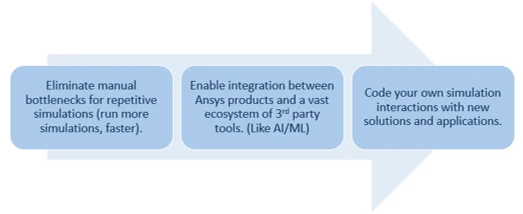
To simplify the setup, PyAnsys offers a Python metapackage, ensuring compatibility across its various projects. This ecosystem supports a wide range of applications, including structural analysis, fluid dynamics, and electromagnetics. By bridging the gap between Python and Ansys, PyAnsys enhances accessibility, eliminates the constraints of traditional graphical interfaces, and enables users to customize and streamline their simulation workflows like never before.
Fig 2 · What PyAnsys enables
At its core, PyAnsys brings the versatility and ease of Python scripting to the highly powerful and advanced simulation tools within the Ansys suite. Whether you're looking to streamline pre-processing, post-processing, or entire simulation workflows, PyAnsys opens endless possibilities to enhance productivity and make simulations more accessible.
Section 02Classification of PyAnsys
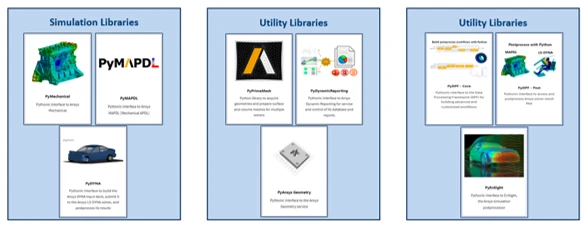
There are many libraries available. These packages can be separated into three categories:
Below is an illustration of the most useful packages for structural engineers:
Fig 3 · Most useful PyAnsys packages for structural engineers
Section 03Core PyAnsys Modules
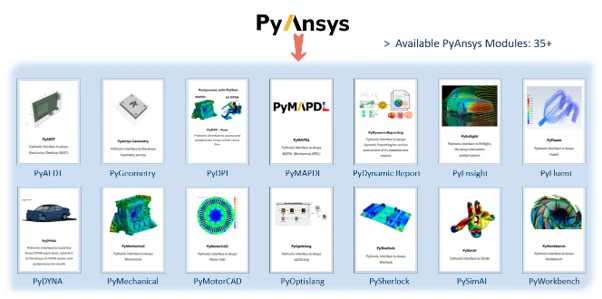
The PyAnsys package includes several modules that provide essential functionality across multiple engineering disciplines, supporting tasks such as geometry modelling, mathematical computations, electric vehicle modelling and more.
Fig 4 · Available PyAnsys modules (35+)
Section 04Categorized Breakdown of the PyAnsys Ecosystem Modules
01. Structures (Mechanical, Composites, and Post-processing)
PyACP – Model continuous-fiber composite structures directly in your Python environment. It provides a Python interface to the features of Ansys Composite PrepPost (ACP), enabling efficient automation of design, analysis, and optimization for composite structures.
PyAdditive – A Python client library for the Ansys Additive server, which is included with the Additive option in the Structures package of the Ansys unified installation.
PyAdditive Widgets – A widget toolkit for PyAdditive simulations, offering methods to visualize the results of parametric additive simulations.
PyDYNA – Simplifies the creation of Ansys DYNA input decks, submission to the Ansys LS-DYNA solver, and postprocessing of results, offering a more convenient and comprehensive workflow.
PyMAPDL – A key component of the PyAnsys ecosystem, enabling seamless integration and interaction with Ansys Mechanical APDL directly from Python.
PyMAPDL Reader – A legacy Python module for reading binary and ASCII files from MAPDL (v14.5+). It enables direct data extraction, visualization, and animation using a simple API and C libraries based on Ansys headers.
PyMechanical – Enables integration of the Ansys Mechanical solver into Python applications via ansys-mechanical-core, providing a Python-friendly interface for Mechanical scripting commands.
PyAnsys Sound – A Python wrapper for Ansys Sound, enabling sound and vibration postprocessing and analysis using PyDPF-Core and the DPF Sound plugin.
02. Fluids (CFD & Post-processing)
PyFluent – A Python library for automating and customizing Ansys Fluent CFD workflows, enabling programmatic interaction for enhanced flexibility and efficiency.
PyFluent-Visualization – Postprocess Fluent results by displaying graphical objects and plotting data, enabling efficient visualization and analysis.
PyEnSight – Ansys EnSight is a comprehensive postprocessor and data visualization tool that handles large simulation datasets across various engineering disciplines, enabling simultaneous data loading and analysis.
PyRocky – A Python client library for creating, running, and postprocessing particle dynamics simulations with Ansys Rocky, a leading discrete element method (DEM) software.
PyTurboGrid – Enables integration with Ansys TurboGrid via a client-server architecture using TCP/IP for seamless communication and automation.
03. Electronics (EDA, Thermal & Antennas)
PyAEDT – A Python client library that interfaces directly with the Ansys Electronics Desktop (AEDT) API, enabling seamless and efficient workflow automation.
PyEDB – PyEDB (Electronics Database) provides a streamlined interface to the PyEDB-Core API, simplifying scripting and automation for electronic design workflows.
PyEDB-Core – Provides direct access to the PyEDB-Core API, simplifying scripting and automation for electronic design workflows.
PyMotorCAD – Enables access to Ansys Motor-CAD through Python, allowing for seamless automation and integration in electric machine design workflows.
PySherlock – A Python client library for Ansys Sherlock, enabling automation and integration of electronics reliability analysis workflows.
PyConceptEV – A Python client library for the Ansys ConceptEV service, a cloud-based platform for designing and simulating EV powertrains at the concept stage.
PySeascape – A Pythonic remote interface for RedHawk-SC and Totem-SC, enabling integration with PyAnsys and other Python libraries.
04. Digital Twin & System Simulation
PyTwin – Enables deployment of twin runtimes within Python environments, integrating seamlessly with PyAnsys and external libraries.
PySystemCoupling – Enables the use of System Coupling in any Python environment. It integrates seamlessly with other Ansys Python libraries and external Python tools for multiphysics simulations.
05. CAD & Meshing
PyAnsys Geometry – A Python client library designed to interface with the Ansys Geometry service, enabling seamless geometry management and automation.
PyPrimeMesh – Provides Python modules for geometry acquisition and mesh preparation for various solvers, with ansys-meshing-prime as its core package.
06. AI & Data Science
PySimAI – Enables integration of SimAI within Python environments, allowing data management and access alongside PyAnsys and external libraries.
07. Materials & Manufacturing
PyGranta – PyAnsys packages that integrate with Granta MI services, enabling seamless material data management and analysis.
08. Connect & Platform Tools
PyOptiSLang – Enables integration with Ansys optiSLang via a client-server architecture using TCP/IP for seamless communication and process automation.
PyPIM – PyPIM (Product Instance Management) enables PyAnsys libraries to seamlessly switch to a remote instance in a suitable environment.
PyHPS – Ansys HPC Platform Services (HPS) manages simulation execution across computing resources. PyHPS integrates HPS into Python applications, wrapping around HPS REST APIs for seamless access.
PyModelCenter – Ansys ModelCenter Workflow is a Python client library for Ansys ModelCenter, enabling the creation and automation of engineering workflows.
09. Workbench & System Integration
PyWorkbench – Provides an environment for leveraging various PyAnsys modules within Ansys applications integrated with Workbench, enabling seamless automation and workflow optimization.
10. Shared Components
Shared Components – OpenAPI Common – Libraries designed to enable code-sharing across PyAnsys packages, supporting Python-based integration of Ansys products without being tied to specific tools.
11. Data Processing & Reporting
PyDPF-Core – Ansys Data Processing Framework (DPF) is a physics-agnostic toolbox for accessing, transforming, and processing large simulation datasets. It enables complex pre/postprocessing within workflows and integrates with various apps for data input, output, and visualization.
PyDPF-Post – A DPF toolbox for engineers to access, transform, and process large simulation datasets, enabling complex pre- and postprocessing within workflows.
PyDPF-Composites – Facilitates post-processing of composite structures using Ansys DPF and the DPF Composites plugin. It provides classes for short-fiber and layered composites, enabling analysis of fiber-reinforced plastics and custom failure criteria implementation.
PyDynamicReporting – Ansys Dynamic Reporting (Nexus) powers report generation in Ansys products, enabling data collection from multiple sources, aggregation, analysis, and interactive report creation.
12. Embedded Software Development
PyScadeOne – A Python library designed for the Ansys SCADE One model-based development environment, enabling seamless integration and automation in safety-critical software development.
13. Documentation & User Resources
Ansys Python Manager – Install and manage PyAnsys packages.
PyAnsys Cheat Sheets – Quick reference guides for PyAnsys.
Note: All these modules are available in the PyAnsys documentation at PyAnsys.
Conclusion
PyAnsys is revolutionizing how engineers and researchers approach simulation-driven design. By combining Python's flexibility with Ansys's powerful solvers, PyAnsys opens a world of possibilities for automation, scalability, and customization in simulations. Whether you're a seasoned engineer or a student eager to explore the world of simulations, PyAnsys provides the tools to push the boundaries of what's possible.
In the next blog, we will explore Ansys Python Manager — what it is, its purpose, and how it simplifies working with Ansys using Python. We'll also walk through the installation process and demonstrate an example of how to leverage PyAnsys for automating simulations efficiently. Stay tuned!
Found this useful? Share it
Continue Reading
More from our engineers.
If this article was useful, these picks up where it leaves off — practical reads from the CADFEM engineering practice.